
One system for the whole lifecycle: from equipment register and maintenance to bookings, field logging, contract prices and automatic invoicing — with an integration to your accounting.
Owned and rental equipment in one register. Service history, locations and costs on each equipment card — also for internal use only, without any rental side.
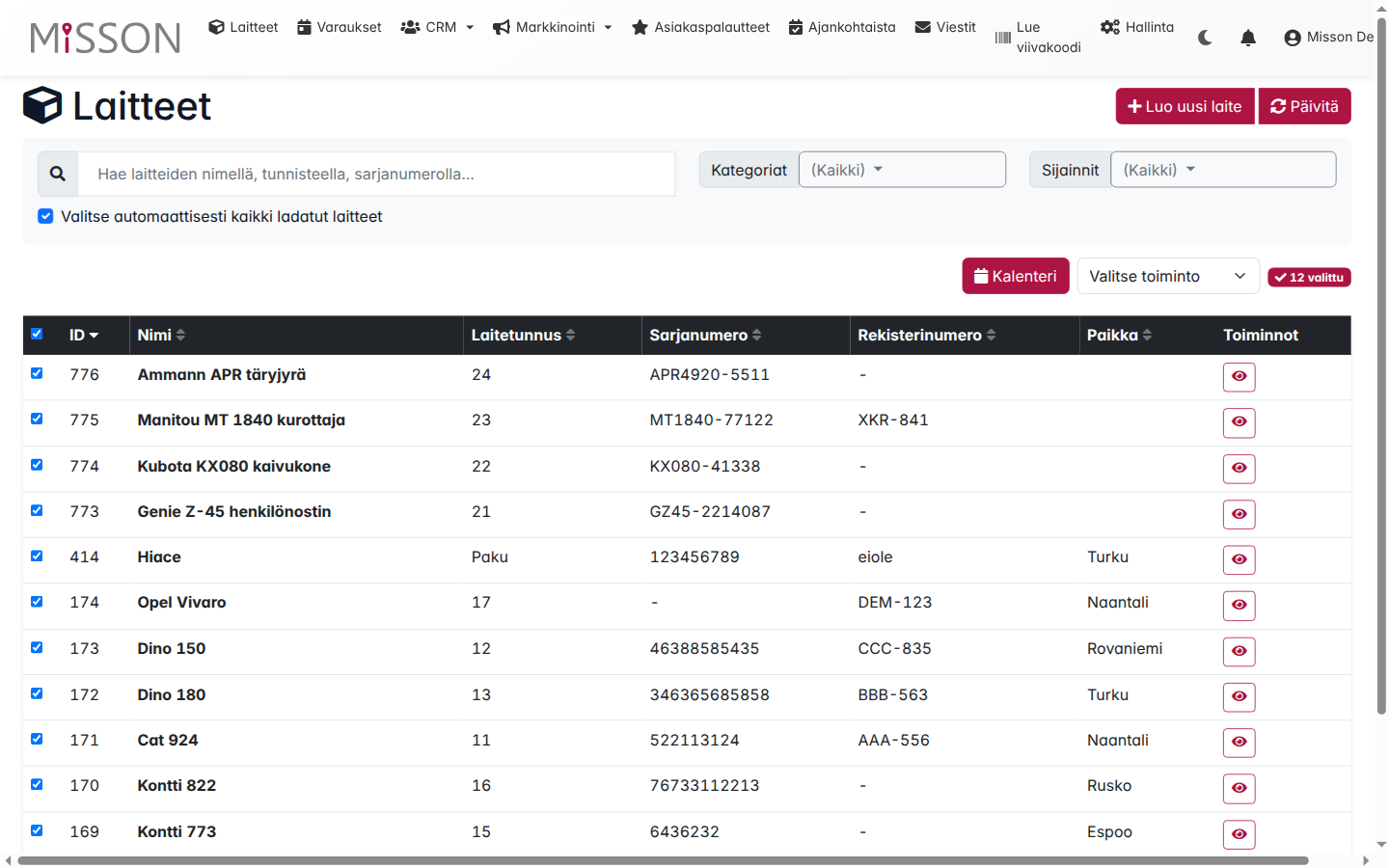
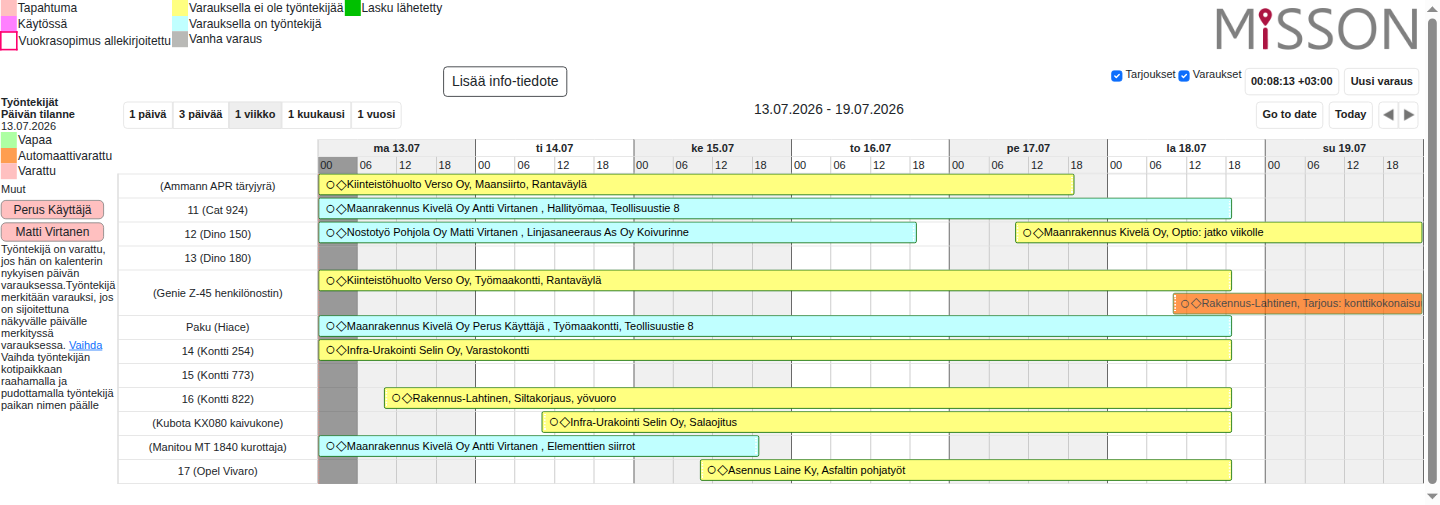
Drag and drop bookings onto the calendar, prevent double bookings automatically, and let the field log hours and attach photos to the job in the browser.
Installers see the day's jobs, work instructions and equipment, complete reports and inspections with photos and log their hours. The app also works on site without a network connection.
Today
Tasks today
The app is included in every plan at no extra cost. An installer is a regular user: the plan's users are included in the price, and each additional user costs €15/month.
During the trial you get the install link for the Android app by email. Ask for it at sales@misson.fi.
Every customer's price lists, discounts and full project history on one card. Extend to a sales pipeline and marketing with the CRM add-on when needed.
Hours, machine rental and transport flow from the job to the invoice automatically. Cost centers and dimensions included — the invoicing integration takes the invoices to Netvisor or Visma once product codes have been mapped during onboarding.
Track utilization and profitability, manage access rights, and operate in three languages across two countries.
See equipment utilization, sales and profitability.
Roles and rights per user — office and field.
Interface and support in Finnish, Swedish and English.
EUR invoicing to both countries, country-specific VAT.
The invoicing integration as an add-on: invoices, dimensions and cost centers transfer to your accounting – product codes are mapped during onboarding. REST API for your own equipment and booking integrations.
See pricing

Netvisor · Visma eAccounting · Visma Ekonomi — plus a REST API for your own systems.
The documented REST API covers assets, bookings, customers, hours, work orders and invoicing. Connect Misson to your own systems — or let an AI assistant handle the routine work for you.
An OpenAPI-documented interface for every module: read and write assets, bookings, hours and invoices from your own system.
Each API key is limited to specific modules and a level — read only or read and write. Usage is logged.
Booking, customer and invoice events are pushed to your system signed — without constant polling.
Connect Claude or another MCP-compatible assistant to Misson. The assistant sees and does only what its key allows.
The technical documentation (OpenAPI and Swagger) opens for logged-in users under Administration → REST API.
Ask about the APICloud-based, mobile and secure. The browser needs no installation, and updates arrive automatically.
Use it in a browser anywhere, no installations.
In the phone's browser or with the Misson Mobile app, which also works without a network.
Entries are saved to the server right away and the office sees them immediately.
New features with no maintenance on your part.
Data in the EU, processed in line with GDPR.
Help in your own language — Finnish and Swedish.
Import equipment and customers from your old system.
Add drivers and installers at an affordable per-user price.
CRM and the invoicing integration are add-ons. User and job limits grow with the plan — see which one fits you.
Core features — equipment, bookings, customers and invoicing — are included in all plans. CRM and the invoicing integration are add-ons. User and job limits vary by plan.
Yes. Equipment management, maintenance and cost tracking also work for internal use only, without renting equipment to others.
In the browser, yes: entries are saved when the device has a network connection. The Misson Mobile app also works without a network. The app downloads the next two weeks of jobs to the phone and sends entries when the connection returns.
Yes. Misson Mobile is available for Android phones, and an iPhone version is coming. The app is included in every plan at no extra cost. During the trial you get the install link by email from sales@misson.fi.
To Netvisor, Visma eAccounting and Visma Ekonomi with the invoicing integration add-on — dimensions and cost centers included.
Yes. Misson has a documented REST API for assets, bookings, customers, hours and invoicing, plus webhooks for events. AI assistants connect through the MCP server. For each API key you define separately which modules it can reach and whether it may also write.
Finnish, Swedish and English — both the software and customer support. Invoicing in EUR to Finland and Sweden.
Yes, you import your data yourself. Equipment and customers can be imported from a CSV or Excel file (.xlsx), and the import page provides a ready-made Excel template. Misson suggests a column mapping based on the headers, and you can change it before importing. A new trial account comes with marked sample data that you can remove. If you need help, ask us by email: sales@misson.fi.
14-day free trial. Import your fleet and customers from CSV.
Card required for verification · No charge before the trial ends · Cancel anytime